A KeyLock device that uses the Electronic Key Value property (CapKeyLockType = 2) works like the existing Dallas Key device. The Keylock device is selected as before in the Hardware Profile card.
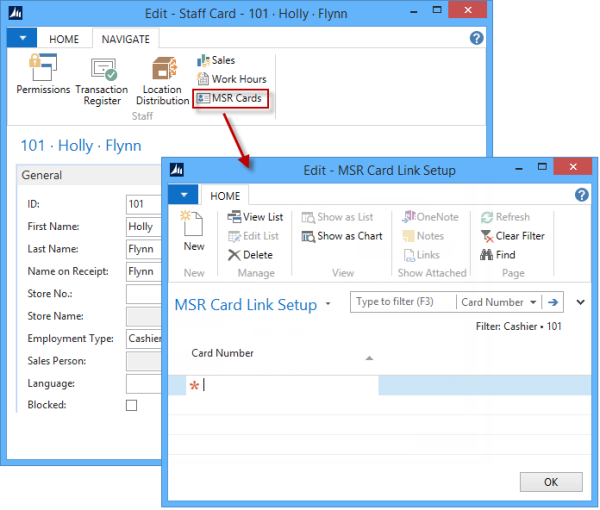
When an Electronic Key Value is changed (for example Dallas Key Inserted/Removed), the ElectronicKeyValue is used to check if an MSR Card Link setup exists for it. If the ElectronicKeyValue exists in the MSR Card Link table and is linked to a staff member, the POS will log that staff On/Off.
Typically, the ElectronicKeyValue is 8 bytes long and in the format "0x00, 0x00, 0x00...". LS Central strips this text and creates an upper case text string of 16 characters, where each 2 characters represent 1 byte (Hexadecimal Encoding). The text value can therefore range from "0000000000000000" to "FFFFFFFFFFFFFFFF".
The POS will interpret an empty string and the "all zero" string as log off. All other values will be used to perform a log on (given that the value exists in the MSR Card Links table).
Setup
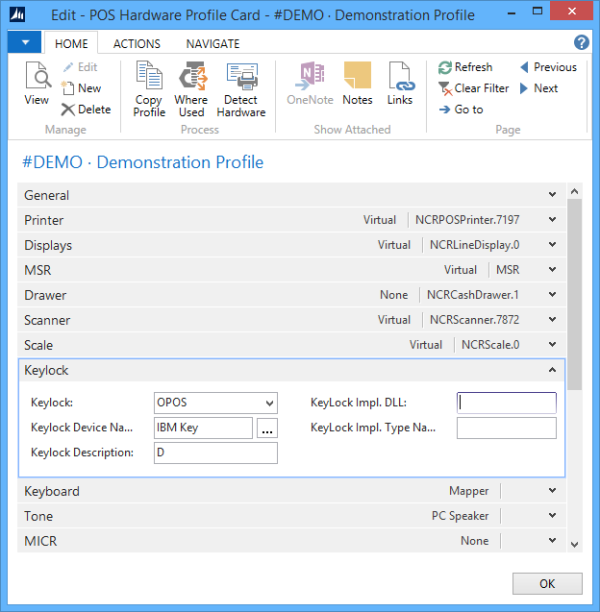
Open the POS Hardware Profile List and select the profile card.
- In the Keylock field, select OPOS.
- In the Keylock Device Name field, click the assist button and select a Keylock device.
Open the Staff List and select a staff card.
- Insert the Electronic Key Value to link to staff.